Agents and Architectures
How Tools Are Selected
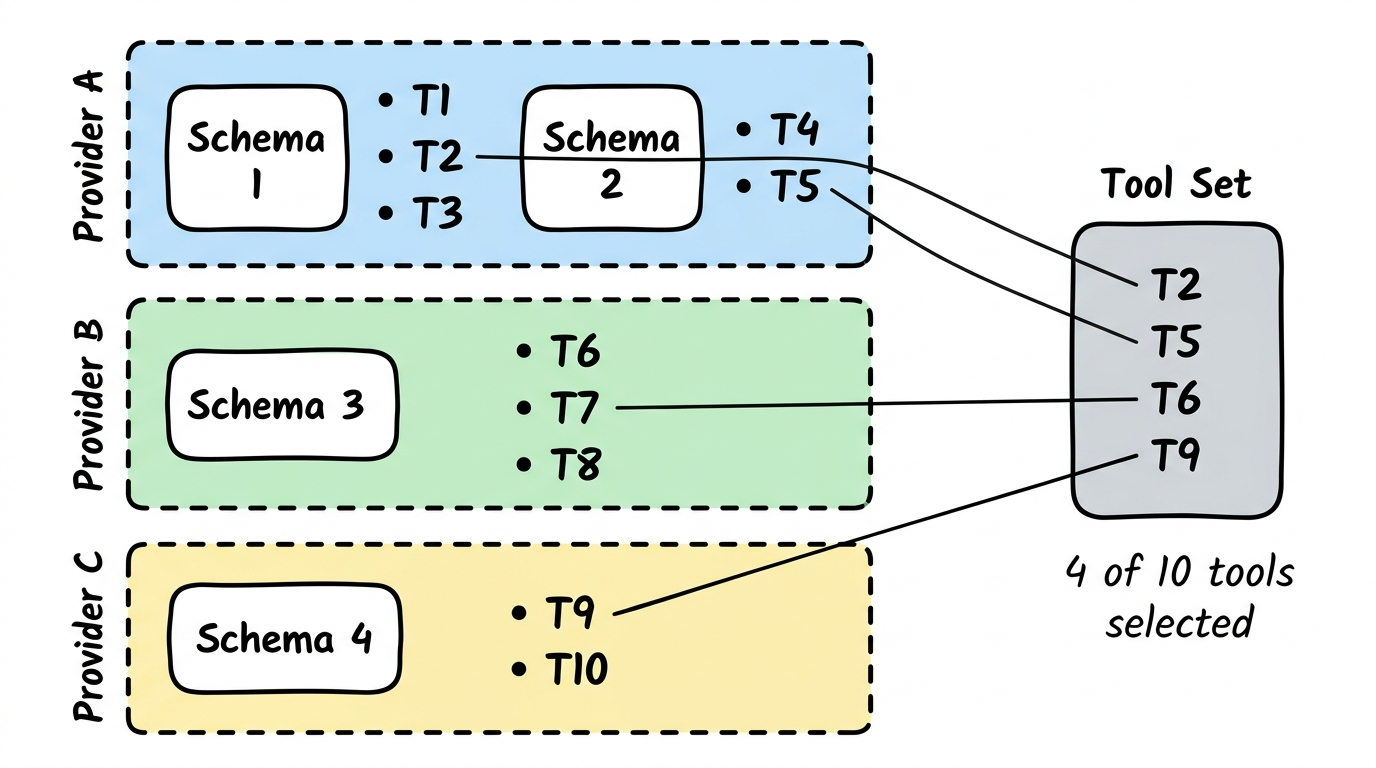
Section titled “How Tools Are Selected”From the schema catalog, individual tools are selected and assembled into a Tool Set. Not all tools are needed — only those relevant to the specific use case.
What is an Agent?
Section titled “What is an Agent?”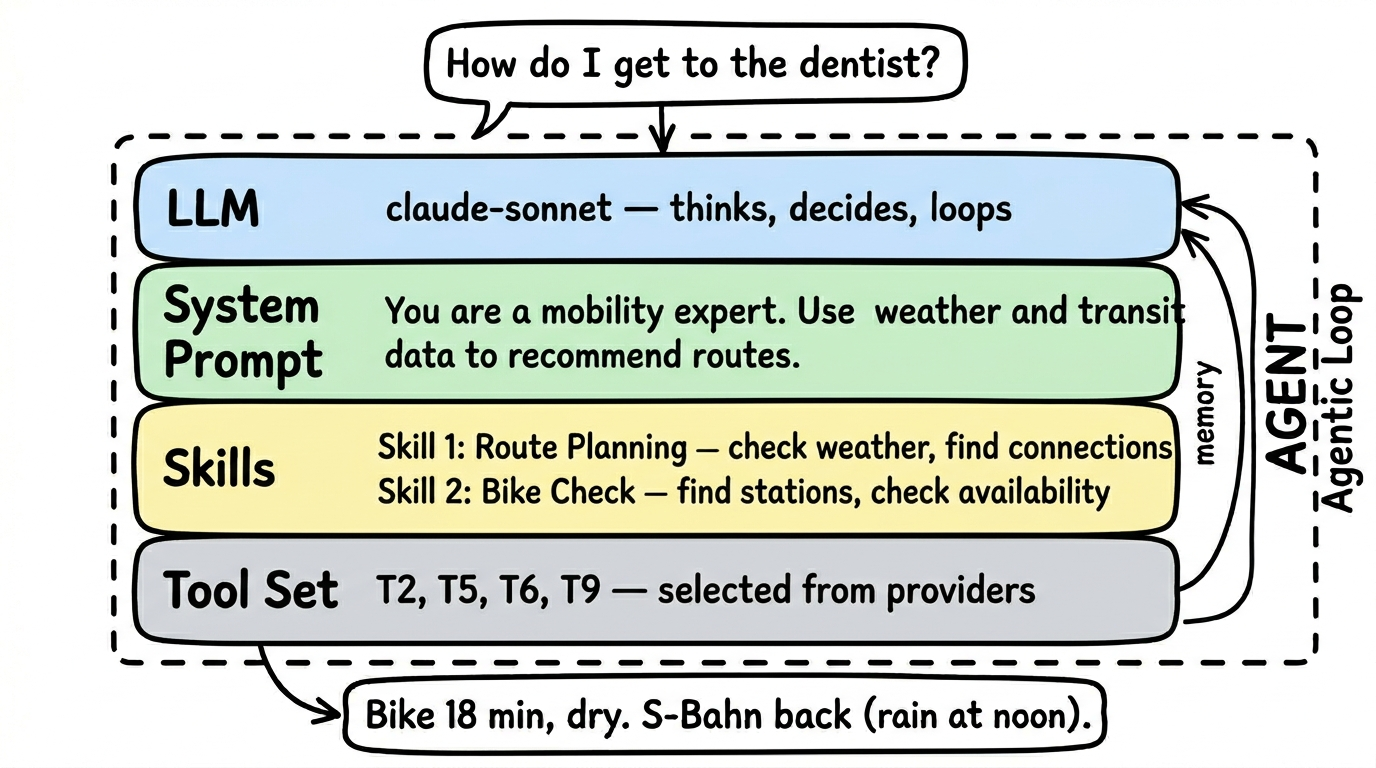
An agent is more than a simple tool query. While a tool asks a single question to a data source (“What’s the weather in Berlin?”), an agent can combine multiple tools, reason, and independently decide what information it still needs.
The key difference: an agent has its own language model (LLM) that thinks for it. It’s not just a program executing commands, but an expert that understands questions, selects tools, and formulates answers.
An agent consists of:
- Its own LLM — the language model the agent uses to think and decide
- A system prompt — defines behavior: “You are a mobility expert. Answer questions about connections, weather, and sharing options.”
- Tool references — the agent selects tools from various provider schemas. It doesn’t take all of them, only the relevant ones.
- Tests — verify that the combination of LLM, prompt, and tools actually works
Example: A Mobility Agent combines tools from the DB schedule schema (getConnections), the OpenWeather schema (getWeather), and the nextbike schema (findStations). It uses Claude Haiku as its LLM and knows from its system prompt that it should answer mobility questions.
The Agentic Loop
Section titled “The Agentic Loop”An agent works not linearly, but in loops. This is the central difference from a simple tool call:
- Understand the question — What does the user want to know?
- Select a tool — What data do I need?
- Call the tool — Query the data
- Evaluate the result — Is this enough? Do I have everything?
- Decide — Done → formulate answer. Or: need another tool → back to step 2.
The loop runs until the answer is complete — or a configured maximum of iterations is reached.
Why this matters: When someone asks “Should I bike or take the S-Bahn tomorrow?”, the agent must:
- First check the weather (Tool 1)
- Then query S-Bahn connections (Tool 2)
- Then check if there are bike stations nearby (Tool 3)
- Only then formulate a recommendation
A simple tool call could only do one of these steps. The agentic loop does all of them — and thinks in between.
The tradeoff: The agent needs its own LLM. That costs compute. But the answer quality is significantly better than individual tool calls.
Three Usage Architectures
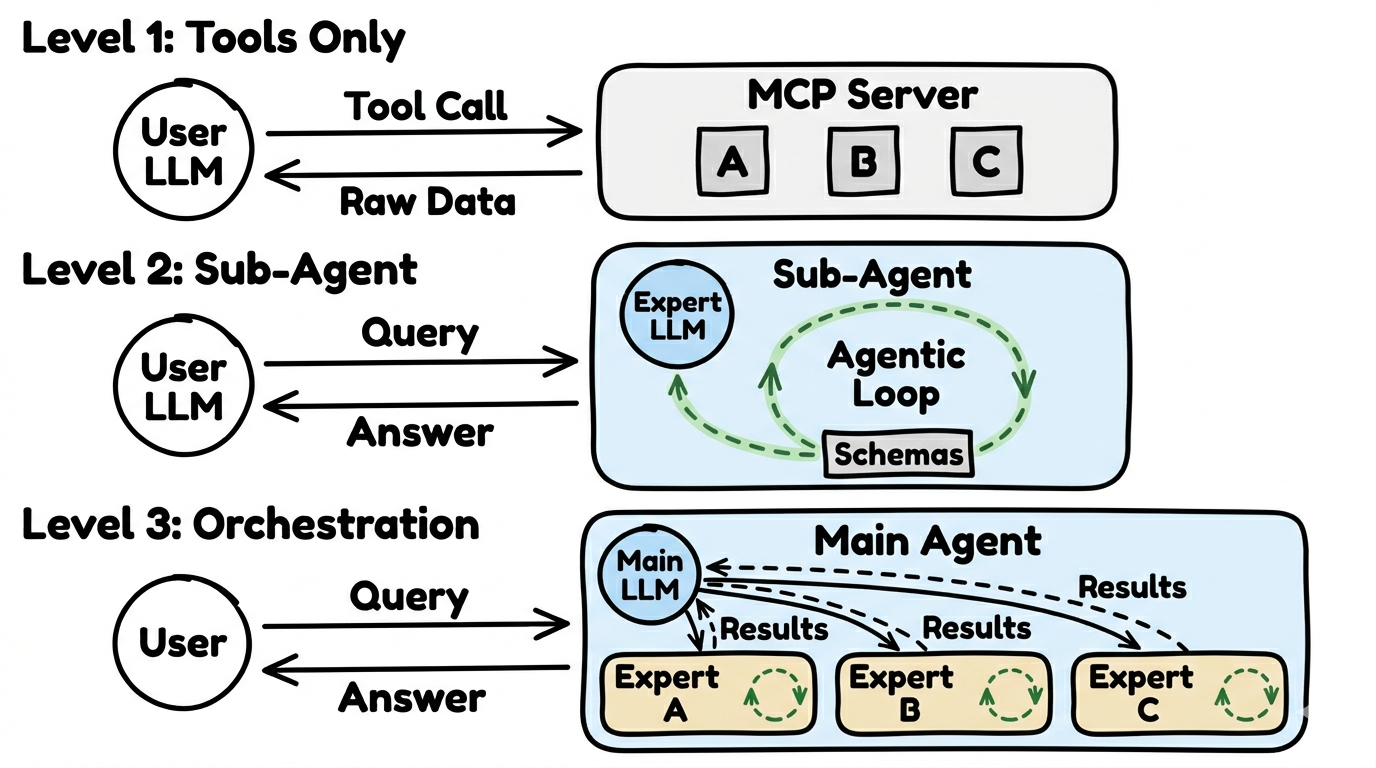
Section titled “Three Usage Architectures”Not every request needs a full agent. There are three levels — from simple to complex:
Level 1: Tools Only
Section titled “Level 1: Tools Only”The simplest level. The user’s AI calls individual tools directly — no agent, no loops, no additional LLM.
- How it works: The user asks “What’s the weather in Berlin?”, the AI recognizes the right tool and calls it
- Result: Raw data that the user’s AI interprets itself
- Advantage: Fast, cheap, works with 108+ MCP clients
- Disadvantage: No combining multiple data sources, no loops
Level 2: Sub-Agent
Section titled “Level 2: Sub-Agent”A specialized agent with its own LLM. It has its own tools, its own logic, and can use the agentic loop.
- How it works: The request goes to an expert agent that independently selects and combines the right tools
- Result: An interpreted, prepared answer — not just raw data
- Advantage: Better answer quality, combining multiple data sources
- Disadvantage: Needs an additional LLM, costs more compute
Level 3: Orchestration
Section titled “Level 3: Orchestration”The most complex level. A coordinator agent distributes requests to multiple sub-agents. Each sub-agent is an expert in its domain.
- How it works: The coordinator understands the question, decides which experts need to be consulted, collects their answers, and formulates an overall response
- Result: A combined, optimized answer from multiple domains
- Advantage: Complex questions can be answered that no single agent could handle alone
- Disadvantage: Multiple LLMs run in parallel — highest compute cost
Elicitation: When the Agent Asks Back
Section titled “Elicitation: When the Agent Asks Back”Not every question can be answered immediately. “How do I get to the train station?” — Which station? From where? On foot or by bus?
Elicitation allows the agent to ask structured follow-up questions before answering. This is a feature of the MCP protocol and works from Level 2 onward.
Examples of follow-up questions:
- “What location do you want to start from?”
- “Do you mean today or tomorrow?”
- “Should I also consider sharing options?”
- “Do you mean Berlin Hauptbahnhof or Berlin Suedkreuz?”
Why this matters so much: Without elicitation, the agent has to guess or work with incomplete information. With elicitation, it asks — and the answer becomes significantly better. The difference is often between a useful and a useless response.
Not all clients support elicitation. Currently, 16 MCP clients do — including Claude Desktop, OpenClaw, and Codex. Clients without elicitation still work with Level 2 and 3 — the agent just can’t ask follow-up questions and works with what it has.
Which clients support what: Clients and Compatibility →
Example: Level 3 in Practice
Section titled “Example: Level 3 in Practice”A typical Level 3 implementation uses a coordinator agent that routes requests to specialized sub-agents. Each sub-agent has access to specific schemas and tools.
For example, a travel planning system might use:
- A Schedule Agent (train connections, flight data)
- A Weather Agent (forecasts, alerts)
- A Location Agent (geocoding, points of interest)
The coordinator decides which agents to involve based on the user’s question. This pattern works across any domain where multiple data sources need to be combined.
Learn More
Section titled “Learn More”- Agent manifests and configuration: Agents Overview
- FlowMCP Specification: FlowMCP Spec v3.0.0
- MCP Clients: modelcontextprotocol.io/clients