Schemas and Tools
What is a Schema?
Section titled “What is a Schema?”A schema is the complete blueprint for accessing a data source. It describes a single data provider — for example the German Weather Service, Deutsche Bahn, or a bike-sharing system like nextbike.
One schema per data provider. Multiple tools per schema.
The schema does not change the data source itself. It translates between the provider’s API and the AI — so the AI can query the data in a structured way without having to read and interpret the API documentation itself.
What’s Inside a Schema?
Section titled “What’s Inside a Schema?”A schema contains four sections. Only Tools are required — the other three are optional and come into play with more complex data sources.
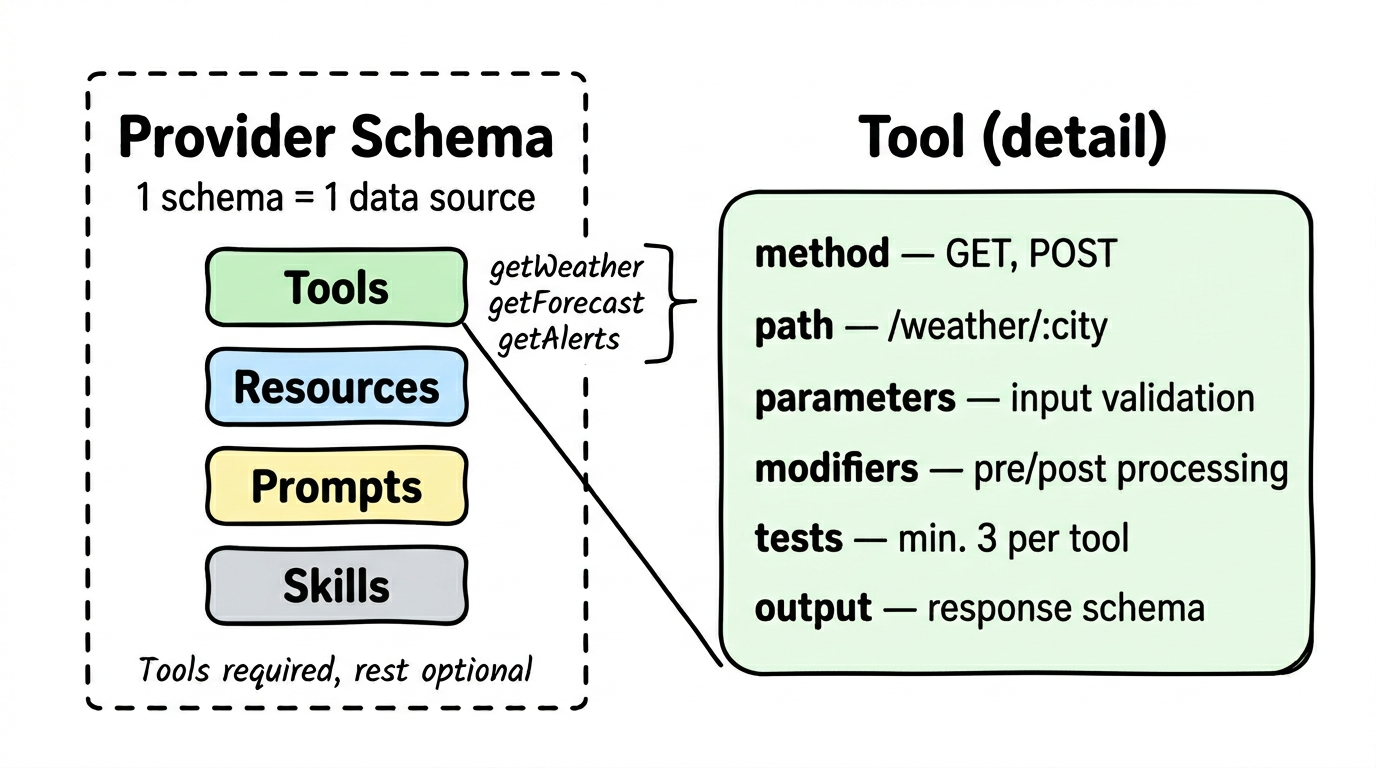
Tools (Required)
Section titled “Tools (Required)”Tools are the core building blocks. Each tool is a single query to the data provider’s API. A schema can contain multiple tools — typically between 2 and 8.
Each tool defines:
| Component | What it does |
|---|---|
| method | HTTP method (GET, POST) |
| path | The API endpoint (e.g., /weather/:city) |
| parameters | What goes in — with validation (type, required, limits) |
| modifiers | Pre- and post-processing of data |
| tests | At least 3 test cases per tool — ensuring it works |
| output | What comes back — as a structured schema so the AI understands the response |
Resources (Optional)
Section titled “Resources (Optional)”Local data that doesn’t come from an API but is delivered directly with the schema. For example, a SQLite database with reference data or a Markdown file with explanations.
Prompts (Optional)
Section titled “Prompts (Optional)”Guidance for the AI on how to best use this provider’s tools. Formulated model-neutrally — they help any AI, not just a specific one.
Skills (Optional)
Section titled “Skills (Optional)”Step-by-step instructions for complex workflows combining multiple tools. For example: “First find the station, then query connections, then compare prices.”
Example: Bright Sky (German Weather Service)
Section titled “Example: Bright Sky (German Weather Service)”The Bright Sky schema makes DWD weather data accessible. It contains two tools:
- getWeather — Current weather for a location (Parameters: latitude, longitude, date → Result: temperature, precipitation, wind, cloud cover)
- getForecast — 7-day forecast for a location (Parameters: latitude, longitude → Result: forecast per day)
Data source: https://api.brightsky.devTool: getWeatherCall: GET /weather?lat=52.52&lon=13.41&date=2026-03-28Result: { temperature: 14.2, precipitation: 0, wind_speed: 12.5 }The AI sees this tool and knows: “I can query weather with this.” It doesn’t need to know the DWD’s API documentation — the schema has already done that work.
How Does a Schema Become Usable?
Section titled “How Does a Schema Become Usable?”A schema starts as a .mjs file — a description in code. For the tools it contains to become available to AI clients, a server needs to provide them.
That’s what FlowMCP does — an open-source framework that loads schemas, validates the structure, runs the tests, and exposes the tools via the Model Context Protocol (MCP). Over 100 AI clients already support MCP — from Claude to ChatGPT to Cursor.
The result: a tool defined in a schema can be called by any MCP-compatible AI. Described once, usable everywhere.
How Are Schemas Created?
Section titled “How Are Schemas Created?”Schemas are created and maintained by the community and the FlowMCP team — based on publicly accessible API documentation and in collaboration with data partners. Each schema is tested (at least 3 tests per tool), validated, and documented before it becomes available.
The community can contribute schemas through a 5-stage pipeline with automatic validation, AI review, and human approval. The principle: “Validated once, for all.” What has been carefully reviewed once is available to everyone afterward.
Create Your Own Schemas
Section titled “Create Your Own Schemas”Schemas follow the FlowMCP Specification v3.0.0:
- Documentation: Schema Overview
- Specification: FlowMCP Spec v3.0.0
- How to contribute: Community Hub →
- Schema repository: github.com/flowmcp/flowmcp-schemas-public