Community Hub (Coming Soon)
The Idea
Section titled “The Idea”Public data belongs to everyone. But preparing this data for AI systems is expensive. When every AI does this work on its own — reading API documentation, guessing endpoints, figuring out parameters — enormous compute is wasted. And results are inconsistent because every AI takes a different path.
Our solution: A schema is created once, validated once, and can then be used by every AI. This saves energy, creates consistency, and makes data reliably accessible. We call this principle “Validated once, for all”.
The Community Hub is where this principle becomes reality. It is not a central service or a backend — it is a GitHub repository that grows through community processes.
GitHub as Primary Platform
Section titled “GitHub as Primary Platform”We deliberately use GitHub as the platform for the hub:
- Schemas without API keys need no backend. No secrets, no server security. Everything can be public.
- GitHub provides everything we need: Issues for submissions, Pull Requests for reviews, Actions for automated tests, Discussions for questions.
- Traceability: Every change is versioned and transparent. Who contributed what and when is permanently verifiable.
- No backend means: less maintenance, less attack surface, lower cost.
Honestly: GitHub is a company, and not everyone has or wants an account. That is a bottleneck. Long-term, we are thinking about a minimal intermediary service that enables participation without a GitHub profile. But for the start, GitHub is the best solution with the least overhead — and for an open-source project, a GitHub account is reasonable.
Schemas With and Without API Keys
Section titled “Schemas With and Without API Keys”| Type | In Hub? | Note |
|---|---|---|
| Without API key | Yes, fully | Can run completely via GitHub — no backend needed |
| With API key | Yes, but separate scope | User must register with the provider themselves. Clearly marked to avoid surprises |
Two Ways to Use the Project
Section titled “Two Ways to Use the Project”Not everyone needs to contribute. Most users will simply use schemas — and that is perfectly fine.
1. Use Schemas (Default)
Section titled “1. Use Schemas (Default)”Load validated schemas via OpenClaw or CLI and query data. No GitHub account needed, no contribution expected. The schemas are there, they work, you use them.
2. Contribute Schemas (Opt-in)
Section titled “2. Contribute Schemas (Opt-in)”You can additionally create and submit schemas yourself. Maybe you work at an organization that provides public data. Maybe you have a Swagger file and an AI that can turn it into a schema. The path: your AI creates the schema according to our spec, you submit it as an issue, the community reviews it.
The special part: The compute for schema creation comes from the user — their AI does the work. The spec — the rules for how a schema must look — comes from FlowMCP. Without correct spec compliance, nothing gets accepted. But when it passes, the entire community benefits.
This is real crowdsourcing: not just giving feedback, but making productive contributions. Every user with an AI is theoretically also a developer.
The Feedback Loop
Section titled “The Feedback Loop”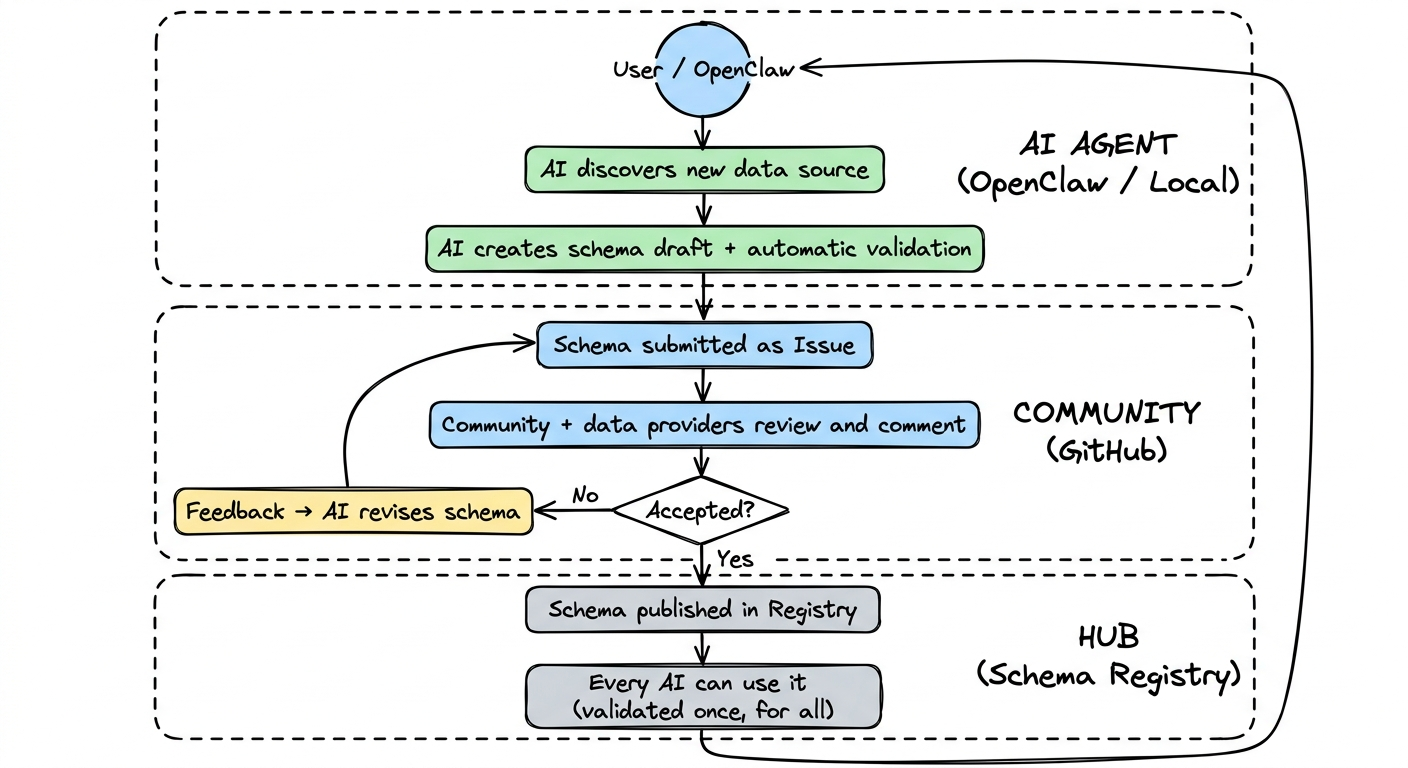
The vision is a self-reinforcing cycle: an AI discovers a new data source, creates a schema draft, submits it as an issue, the community reviews — and if accepted, the schema is available to everyone. Through usage, more data sources are discovered, and the cycle begins again.
The Schema Pipeline: 5 Stages
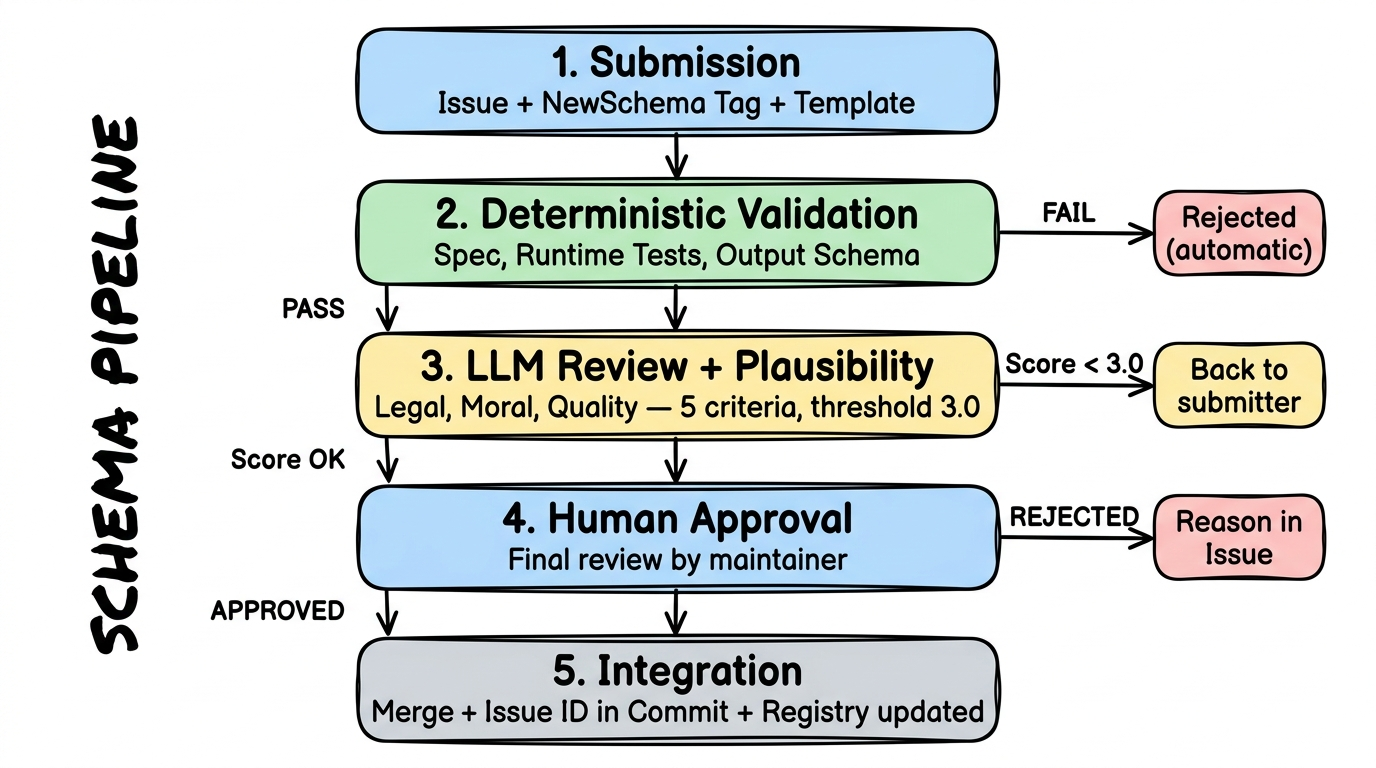
Section titled “The Schema Pipeline: 5 Stages”Every new schema goes through the same pipeline. No exceptions — not even for us as the project team. This process ensures that only quality-checked schemas end up in the hub.
Stage 1: Submission
Section titled “Stage 1: Submission”A user creates an Issue in the schema repository with the tag NewSchema. The issue follows a fixed template — machine- and human-readable:
- Top: Provider description, available routes, license information
- Middle: Arguments from the submitting AI — why this schema, license proof, plausibility assessment
- Bottom: The actual schema code as a Markdown code block
The entire process is designed so that unknown AI systems can make understandable submissions.
Stage 2: Automatic Validation
Section titled “Stage 2: Automatic Validation”A GitHub Action is triggered by the NewSchema tag and checks deterministically:
- Is the schema parseable and FlowMCP spec compliant?
- Do described routes match the actual schema?
- Do runtime tests pass? (real API calls)
- Does the output match the defined output schema?
- Does each route have at least 3 tests?
If anything fails here, the schema is immediately rejected — with automatic feedback directly in the issue. No human effort for obviously flawed submissions.
Stage 3: AI Review and Plausibility
Section titled “Stage 3: AI Review and Plausibility”What automated tests cannot catch, an AI reviews:
- Legal concerns: Is the license clear and verifiable? Just because someone writes “MIT License” does not mean the data is actually freely available. Similar to consumer protection law: if something sounds too good to be true, there is a duty to verify.
- Moral concerns: Are there problematic contents?
- Quality: Are descriptions meaningful? Naming conventions followed? Do returned data match the description?
The submitting AI can have arguments prepared — for example: “The data are official government publications and therefore in the public domain. Here is the link to the original source.”
This review follows a scoring system (see below).
Stage 4: Human Approval
Section titled “Stage 4: Human Approval”A maintainer gives final approval. The entire process so far — automated tests, AI evaluation, arguments — is documented in the issue history. The human checks what neither tests nor AI can reliably judge: Does this schema fit the project? Is the data source trustworthy?
The human has the final word — always.
Stage 5: Integration
Section titled “Stage 5: Integration”The schema is merged. The issue ID is referenced in the commit so that the origin of every schema is traceable. The registry is automatically updated. From this moment on, every user can use the schema.
Quality Standards and Scoring
Section titled “Quality Standards and Scoring”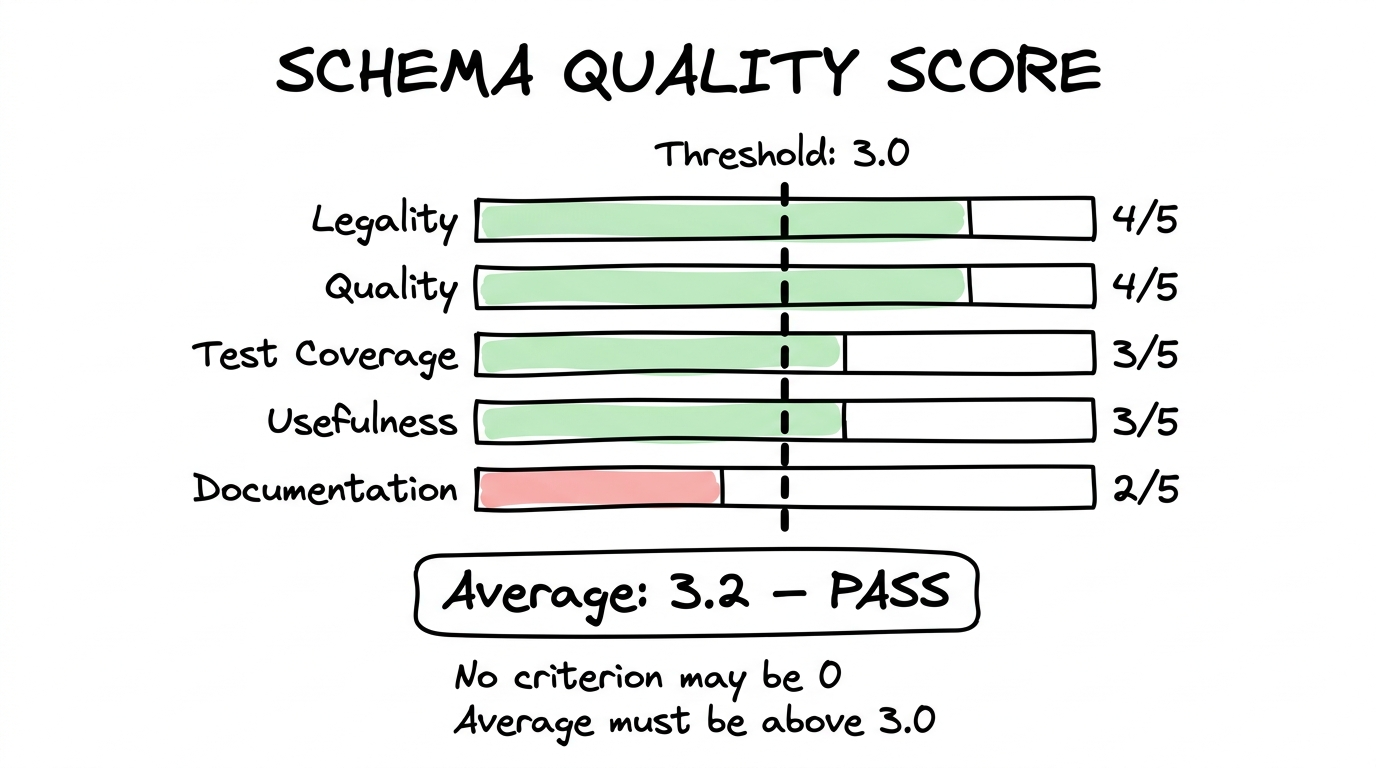
Each schema is evaluated in Stage 3 across five criteria, each rated 0 to 5 stars:
| Criterion | What is evaluated |
|---|---|
| Legality | License clear and plausible? Data origin verifiable? |
| Quality | Descriptions understandable? Naming conventions followed? |
| Test Coverage | Enough tests? Edge cases considered? |
| Usefulness | Relevant data source? Reliable? Demand exists? |
| Documentation | Issue thorough? Arguments traceable? Sources linked? |
Thresholds:
- The average across all five criteria must reach at least 3.0 stars
- No single criterion may have 0 stars — if any area completely fails, the schema is rejected
- Borderline cases allow the submitter to improve and resubmit
This scoring system is a first draft. Criteria and thresholds will be iteratively refined as real submissions come in. What matters: the process is traceable, transparent, and documented in the issue history.
Open Questions — Honestly Named
Section titled “Open Questions — Honestly Named”We know this approach brings challenges for which there is no perfect solution yet:
- Not everyone has GitHub: About 90% of OpenClaw users do not have a GitHub profile today. Long-term, we plan a minimal intermediary service so that users without GitHub can also contribute. For the start, we use GitHub Issue Templates as the lowest barrier.
- Fraud and quality: When any AI can submit schemas, flawed or malicious submissions will come in. That is why we have the 5-stage pipeline: automated tests catch the obvious, AI review uncovers subtleties, and a human decides in the end.
- Scaling: How many submissions can a small team review? That depends on how well automated stages 2 and 3 work. The better the automation, the more the community can grow.
We communicate these open points deliberately and transparently. A project that claims to have all the answers is not credible. One that asks the right questions and works on solutions is.
Get Involved
Section titled “Get Involved”There are several ways to contribute to the project:
- Become a data partner: You have access to public data and want to make it accessible for AI systems? Meet the team →
- Contribute schemas: You have an AI and a data source? Create a schema following the FlowMCP Spec and submit it as an issue.
- Give feedback: Something is not working? A data source is missing? Issues on GitHub are the right place.
Schema repository: github.com/flowmcp/flowmcp-schemas-public