
Clients and Compatibility
FlowMCP schemas work with any MCP-compatible client. This page covers the protocol they rely on, which clients support what, and what running them through the CLI gives you.
MCP — The Connecting Protocol
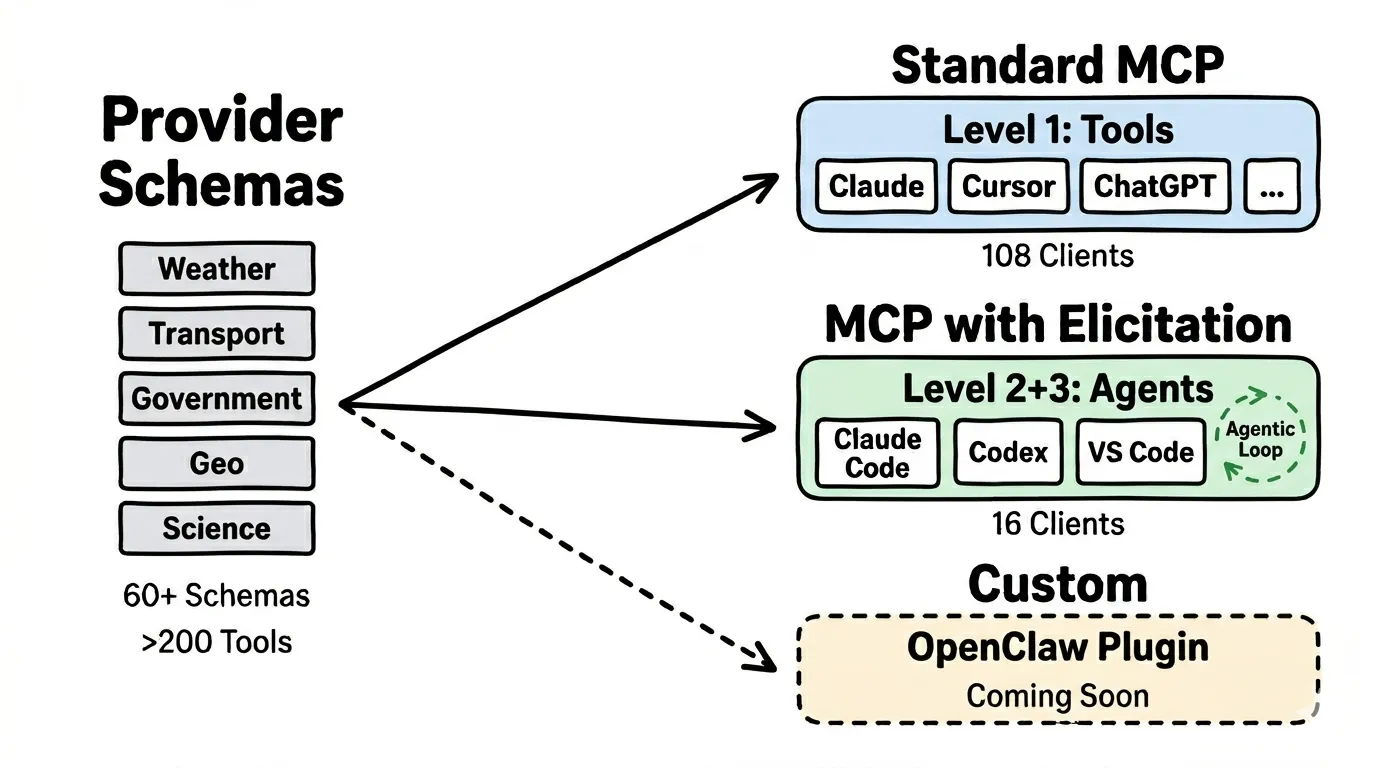
Section titled “MCP — The Connecting Protocol”The Model Context Protocol (MCP) is the standard through which AI clients access tools. It defines how tools are described, called, and how results are returned. Over 100 clients support MCP already — from Claude to ChatGPT to Cursor.
FlowMCP schemas are based on MCP and work with any compatible client. You are not locked into any specific provider.
Compatibility Table
Section titled “Compatibility Table”Not every client can do everything. Capabilities depend on which MCP features the client supports:
| Level | What is supported | Number of Clients | Examples |
|---|---|---|---|
| Level 1: Tools | Individual tool calls, Resources, Prompts | 46+ clients | Claude, ChatGPT, Cursor, VS Code Copilot, Cline, Continue |
| Level 2+3: Elicitation | Everything from Level 1 + Agent can ask follow-up questions | 16 clients | Claude Code, Claude Desktop, OpenClaw, Codex, Cursor, Postman |
| Custom CLI | Command-line interfaces for direct access | FlowMCP CLI, OpenClaw Plugin | For developers and automation |
What the levels mean: Primitives — Agents
As of: 2026-05-24. Current MCP client list: modelcontextprotocol.io/clients
Clients with Elicitation (Level 2+3)
Section titled “Clients with Elicitation (Level 2+3)”These 16 clients support Elicitation — the agent can ask follow-up questions for better answers: AIQL TUUI, Claude Code, Codex, Cursor, fast-agent, Glama, goose, Joey, mcp-agent, mcp-use, MCPJam, Memgraph Lab, Postman, Tambo, VS Code GitHub Copilot, and VT Code.
OpenClaw
Section titled “OpenClaw”OpenClaw is an open-source AI assistant gateway with a plugin system. The special feature: Cron Jobs — recurring queries that run automatically. For example, a daily mobility recommendation every morning at 7:30 AM.
More: Integration Guide
For the command-line interface — searching, activating, and calling tools from your shell — see the Quickstart guide.
Which Client for Whom?
Section titled “Which Client for Whom?”| You are… | Recommended Client | Why |
|---|---|---|
| Individual | OpenClaw or Claude Desktop | Where you already are, Cron Jobs for automation |
| Developer | Claude Code, Cursor, or FlowMCP CLI | Direct control, fast testing, IDE integration |
| Enterprise | NemoClaw (enterprise security) | Deny-by-default policies, sandbox isolation, audit trail |
Details on enterprise integration: Integration Guide